Használati útmutató Elo E536242
Olvassa el alább 📖 a magyar nyelvű használati útmutatót Elo E536242 (4 oldal) a Eierkoker kategóriában. Ezt az útmutatót 23 ember találta hasznosnak és 2 felhasználó értékelte átlagosan 4.4 csillagra
Oldal 1/4
Tech Support Bulletin
October 3, 2011
Critical Issue: Installing SSDs on Touchcomputers & IDS Computer Modules:
Systems with Microsoft Windows® 7 (or Windows XP/POSReady 2009)
Scenario
If you have ordered an SSD (S-SDolidtate rive) kit to either replace or supplement the factory-installed HDD
(HDDard isk rive) for yourElo TouchSystems Touchcomputeror IDS Computer Module, you need to take
some VERY IMPORTANT steps before using it to ensure that it works properly and to prevent permanent and
unrecoverable damage to the SSD.
Critical Action Needed:
By default, Windows 7 schedules weekly defragmentation of the HDD/SSD to occur. However,
DEFRAGMENTING an SSD will damage and eventually destroy the deviceAfter installing an SSD in a !
Windows system, as soon as the system is rebooted, you MUST IMMEDIATELY take the following steps to
ensure that you do not permanently damage the SSD module:
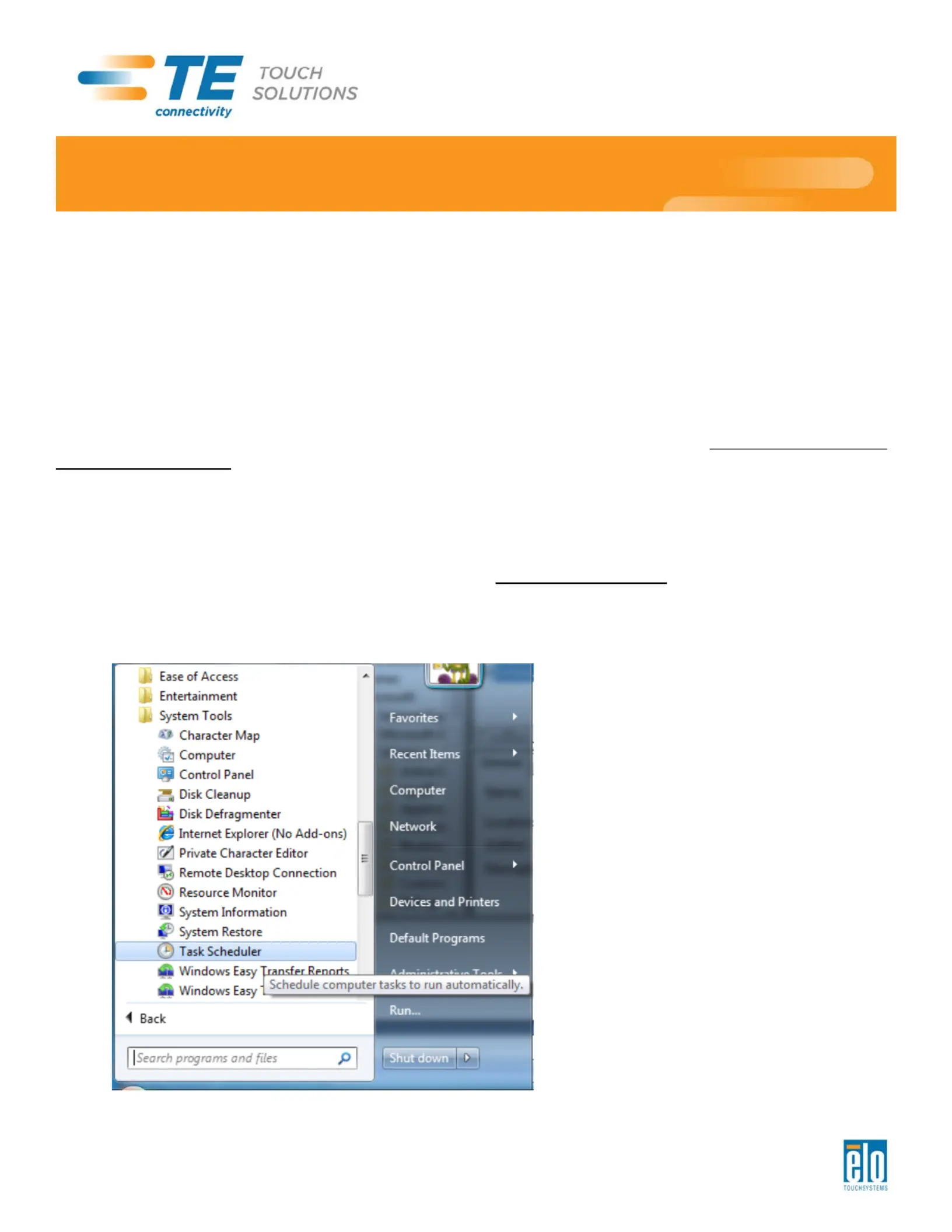
1. In Windows 7, go to: System Tools Task Scheduler (see Start All Programs Accessories
below):
Termékspecifikációk
| Márka: | Elo |
| Kategória: | Eierkoker |
| Modell: | E536242 |
Szüksége van segítségre?
Ha segítségre van szüksége Elo E536242, tegyen fel kérdést alább, és más felhasználók válaszolnak Önnek
Útmutatók Eierkoker Elo

29 December 2024
28 December 2024
Útmutatók Eierkoker
Legújabb útmutatók Eierkoker
10 Április 2025
15 Január 2025
12 Január 2025
11 Január 2025
3 Január 2025
30 December 2025
30 December 2025
30 December 2025
28 December 2024
22 December 2024