Használati útmutató StarTech.com C2-D46-UC2-CBL-KVM
StarTech.com kapcsoló C2-D46-UC2-CBL-KVM
Olvassa el alább 📖 a magyar nyelvű használati útmutatót StarTech.com C2-D46-UC2-CBL-KVM (2 oldal) a kapcsoló kategóriában. Ezt az útmutatót 9 ember találta hasznosnak és 5 felhasználó értékelte átlagosan 4.9 csillagra
Oldal 1/2
Quick-Start Guide
To view manuals, FAQs, videos, drivers, downloads, technical drawings, and more, visit www.startech.com/support.
Manual Revision: April 3, 2023 9:51 AM
Product ID
C2-D46-UC2-CBL-KVM
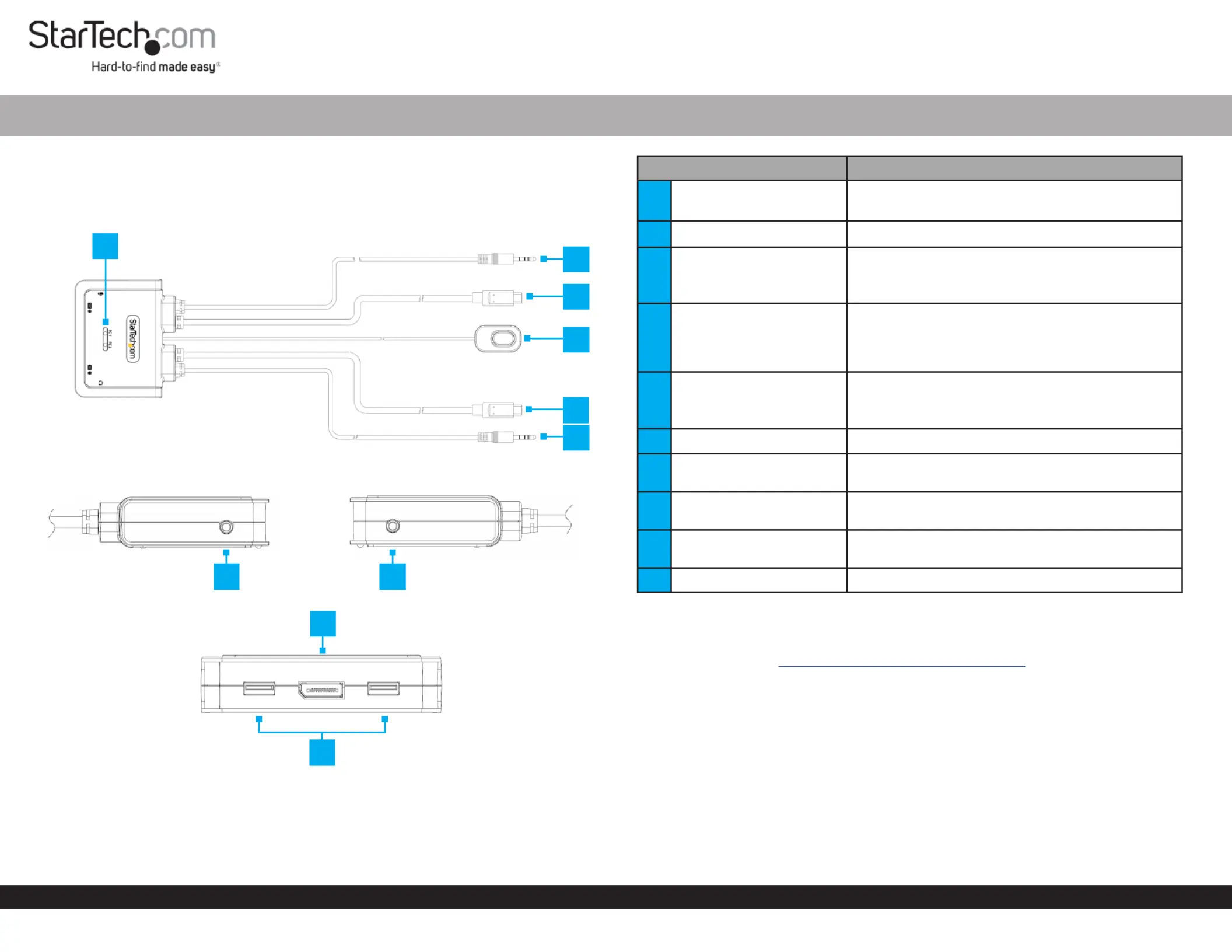
Top
Sides
Front
2-Port USB-C Cable KVM Switch - DisplayPort - 4K 60Hz
ComponentFunction
1LED Indicators
• Solid Green = Selected PC is Connected
• Blinking Green = Selected PC is not detected
2PC 1 Audio Connector• Connect to a on 3.5mm Headset Port PC 1
3
PC 1 USB-C Host
Connector
• Connect to a on USB-C portPC 1
• For full functionality the Host Computer
USB-C PortDP-Alt Mode must support
4Remote Port Selector
• A wired button used to switch between PC 1
and PC2
• Press and Release the to switch Remote Switch
between and PC 1PC2
5
PC 2 USB-C Host
Connector
• Connect to a on USB-C portPC 2
• For full functionality the Host Computer
USB-C PortDP-Alt Mode must support
6PC 2 Audio Connector• Connect to a on3.5mm Headset Port PC 2
7
Console Microphone
Port
• Pink: MicrophoneConnect a
8Console Audio Output
• Green: Audio DeviceConnect an (ie. Speakers
or Headphones)
9
Console DisplayPort
Output Port
• Connect to a DisplayPort Display
10Console USB HID Ports• Connect a and USB MouseKeyboard
Product Information
For the latest manuals, product information, technical specications, and declarations of
conformance, please visit: www.StarTech.com/C2-D46-UC2-CBL-KVM
Package Contents
• KVM Switch x 1
• Quick-Start Guide x 1
2
4
1
78
9
10
3
5
6
Termékspecifikációk
| Márka: | StarTech.com |
| Kategória: | kapcsoló |
| Modell: | C2-D46-UC2-CBL-KVM |
Szüksége van segítségre?
Ha segítségre van szüksége StarTech.com C2-D46-UC2-CBL-KVM, tegyen fel kérdést alább, és más felhasználók válaszolnak Önnek
Útmutatók kapcsoló StarTech.com

30 December 2025
30 December 2025
30 December 2025
17 December 2024
17 December 2024
17 December 2024
17 December 2024
17 December 2024
16 December 2024
16 December 2024
Útmutatók kapcsoló
Legújabb útmutatók kapcsoló
9 Április 2025
9 Április 2025
5 Április 2025
5 Április 2025
5 Április 2025
5 Április 2025
3 Április 2025
3 Április 2025
2 Április 2025
2 Április 2025