Használati útmutató AMX MXA-STMK-07
AMX nincs kategorizálva MXA-STMK-07
Olvassa el alább 📖 a magyar nyelvű használati útmutatót AMX MXA-STMK-07 (2 oldal) a nincs kategorizálva kategóriában. Ezt az útmutatót 14 ember találta hasznosnak és 9 felhasználó értékelte átlagosan 4.6 csillagra
Oldal 1/2
QUICK START GUIDE
MXA-STMK-07 Secure Table Mount Kit
MXA-STMK-07
The MXA-STMK-07 Secure Table Mount Kit (FG5968-67) is a beautifully styled plate
that, when attached to the Modero X Series® 7” Tabletop Touch Panel and secured with
the under-table tamper resistant bolts, will make it virtually theft proof. If drilling into
the table is not feasible, the secure mounting plate can be attached to the touch panel
(but not the table) and then secured with a Kensington® Lock. Use both methods
simultaneously for extra security.
The MXA-STMK-07 is compatible with all Modero X 7” Tabletop Touch Panels, including
the MXT-701 (FG5968-53), MXT-700 (FG5968-04) and MXT-700-NC (FG5968-27).
Installation
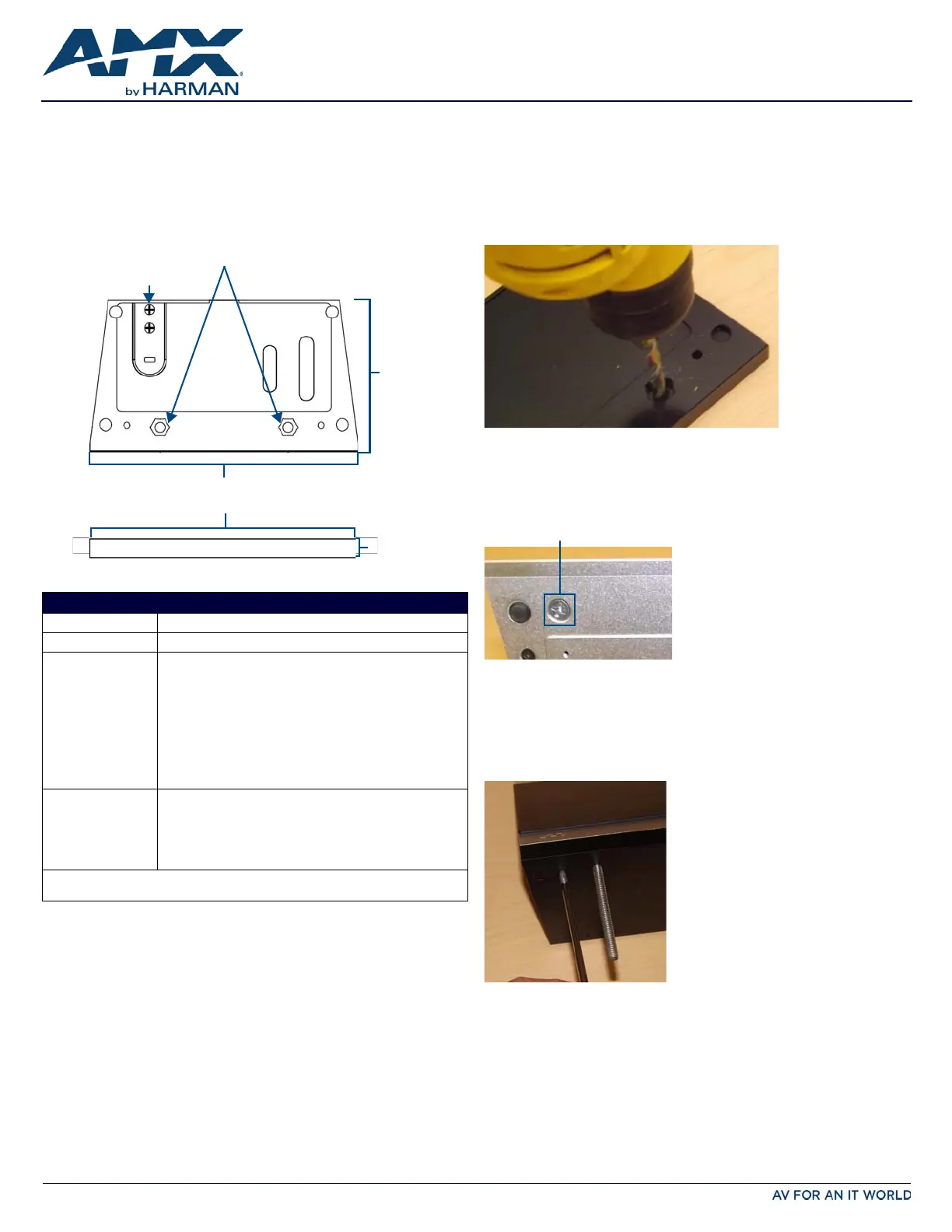
The MXA-STMK-07 may be mounted in one of two ways: it can be affixed to a table or
other surface using the included hex head bolts and tamper-proof nuts, or it can be
allowed to move freely but constrained by a Kensington Lock cable. For additional
security, both options may be used at the same time.
NOTE: For the table mount installation, the tools necessary include a drill with a 1/4” bit,
a Phillips head screwdriver, and an adjustable-head box wrench. The Kensington Lock
installation requires use of a Phillips head screwdriver.
Table Mount Installation
To install the MXA-STMK-07 to a table or other surface:
1.Place the security mount base in the location where it is to be installed, taking
care not to put the mount base past the edge of the table.
2.Mark the location of the hex head bolt holes going through the security mount
base, such as by drilling through the holes into the table (FIG.2).
When drilling through the holes, use a 1/4” or 5/16” drill bit to allow the bolts to
pass through during installation.
Clean out the drilling debris from the holes and from the surface of the table.
3.On the touch panel, turn the touch panel upside down and remove the 2 Phillips
head screws at each corner from the bottom of the device (FIG.3).
The screws to be removed are next to the rubber feet on the front end.
Store these screws in a secure location in case you wish to uninstall the secure
table mount plate.
4.Install the hex head bolts through the security mount base.
Do NOT secure the bolts in the table at this time.
5.Using the two Phillips flat head screws included in the kit, secure the security
mount base to the bottom of the touch panel from the underside of the base
(FIG.4).
These holes must align with the holes in the touch panel’s base from which the
screws were already removed (FIG.3).
6.Pass the hex head bolts through the table.
FIG. 1
MXA-STMK-07 SECURE TABLE MOUNT KIT
PRODUCT SPECIFICATIONS
Dimensions (HWD):0.49” x 7.31” x 4.13” (1.25 cm x 18.56 cm x 10.49 cm)
Weight:1.20 lbs (0.54 kg)
Included Accessories:•Security Mount Base (62-5968-51)
•Kensington Lock Bracket (62-5968-50)
•Screw, 8-32 X .1.00, Torx Flat Head, Black (2) (80-5005)
•Screw, 6-32 X .375, Phillips Flat Head, Black (2)
(80-5006)
•Nut, 1/4-20, Tamper Proof (3) (80-5007)
•Washer, 1.5 Dia X .312 Thick , Nylon (2) (80-5008)
•Bolt, 1/4-20 X 3.00 Hex Head, Black (2) (80-5009)
•Round Dip-Molded End Cap, Black (2) (80-5010)
•MXA-STMK-07 Quick Start Guide (93-5968-67)
Other AMX Equipment:•MXT-700 7.0" Modero X Series Tabletop Touch Panel (FG5968-
04)
•)MXT-701 7.0" Modero X Series G5 Tabletop Touch Panel
(FG5968-53)
•MXT-700-NC 7.0" Modero X Series Tabletop Touch Panel (no
Camera, no Microphone) (FG5968-27)
For more information on the MXT-700 7.0" Modero X Series Tabletop Touch Panel, refer to
the MSD/T-700 Operation Reference Guide (available to view/download at www.amx.com).
Kensington
Lock Bracket
4.13”
(10.49 cm)
7.31”
(18.56 cm)
Top
Front
0.49”
(1.25 cm)
Hex Head
Bolt Holes
FIG. 2 MARKING THE LOCATION OF THE HEX HEAD BOLT HOLES
FIG. 3 LOCATION OF THE PHILLIPS HEAD SCREWS ON THE BOTTOM OF THE TOUCH PANEL
FIG. 4 SECURING THE SECURITY MOUNT BASE TO THE BOTTOM OF THE TOUCH PANEL
Phillips head screw
Termékspecifikációk
| Márka: | AMX |
| Kategória: | nincs kategorizálva |
| Modell: | MXA-STMK-07 |
| Termék színe: | Fekete |
| Kompatibilitás: | MXT-701, MXT-700, MXT-700-NC |
| Felszerelés típusa: | Asztali |
| Képernyőméret-kompatibilitás: | 7 " |
Szüksége van segítségre?
Ha segítségre van szüksége AMX MXA-STMK-07, tegyen fel kérdést alább, és más felhasználók válaszolnak Önnek
Útmutatók nincs kategorizálva AMX

2 Január 2025
2 Január 2025
2 Január 2025
2 Január 2025
2 Január 2025
7 December 2024
3 Szeptember 2024
3 Szeptember 2024
2 Szeptember 2024
1 Szeptember 2024
Útmutatók nincs kategorizálva
Legújabb útmutatók nincs kategorizálva
10 Április 2025
10 Április 2025
10 Április 2025
9 Április 2025
9 Április 2025
9 Április 2025
9 Április 2025
9 Április 2025
9 Április 2025
9 Április 2025